Sniffa


Dani's Blog

Building a 3D Printer

By dani - 25/12/03 16:19

After a few years of just working on different electronic projects, I've constantly been asking a friend who owns a 3d printer for prints.

I finally, "bit the bullet," and decided that it was time I get one of my own.

3D Printer Considerations

The current state of the 3d printer market frankly sucks. It seems that no matter what choice you make, there's going to be compromises. I was looking for a printer that predominately allowed for the following:

  • Customisability (easier servicing).
  • No vendor lock-in.
  • Good community support.
    • This tends to almost go hand-in-hand with no vendor lock-in.
  • The more things open source, the better.
  • Lets me print PLA, PETG and ABS/ASA.
    • Sometimes I need the temperature resistance of ABS, sometimes I just need something to look pretty which PLA is great for.
    • ABS printing = enclosed chamber with some sort of filter system (don't want to contaminate everybody in the house).
  • Multi-filament or multi-toolhead options.

With this in mind, I was was looking at the Elegoo Centuri Carbon due to it being relatively cheap, seemed like there was some community support forming, printer enclosure and it seems there's some solutions for air filtering; and did I mention the price?

Long story short, I sat around for a few months just looking at options. Bambu has become a walled garden, Creality seemed to be making OK printers but with some quality control issues, Prusa seemed like a solid option but is pretty pricy and lastly Sovol seems to be making some great looking printers but I wasn't a fan of the proprietary nozzles.

The Centuri Carbon had the promise of a multi-filament system in the future. I learnt to never buy something based on a promise after buying a few SBC's over the years left me disappointed. The promised release date of the Elegoo multi-filament system came and went. The company didn't seem to be communicating if the project was on hiatus or not. At this point,I felt vindicated on just waiting a few months to see what was going to happen. The Centauri Carbon 2 got shown at an expo and I knew right there and then, the multi-filament system wasn't going to happen.

The friend who I kept asking for prints the past few years then casually mentioned the magic word: Voron.

Enter: Voron Trident

Vorons are a do-it-yourself, open source printer ecosystem. It's got a vibrant community where people mod some of the most useful and most pointless things onto it. Coming from the Linux world, it's almost exactly like how people "rice" their desktops. Your imagination and willpower are the limit.

Due to it also being like a Linux desktop, nothing ever truly will go out-of-date. Because you built the thing, you know how it works and how to fix as well as replace anything that breaks.

Enough fluffing up the project, let's discuss what I saw when I looked at Vorons. There seems to be 3 main models in 2025 which the project as well as the community are actively maintaining:

  • Voron 2.4
  • Voron Trident
  • Voron 0.2

The Voron 2.4's main thing seems to be that it has a flying gantry. This means that the bed doesn't move at all. The X, Y and Z movements mean that motors are moving the nozzle directly into position.

The Voron Trident is more of a classical printer where the X and Y movements are contolled by the gantry. The Z movements are controlled by moving the bed up and down. The Trident has 3 giant screws which hoist and level the bed. Due to it having 3 screws, bed leveling is pretty easy to achieve.

The Voron 0.2 is a miniature classical printer. It's got a similar X and Y system to the trident. The Z seems to be controlled by a couple of motors. Due to it not having as many screws, levelling a 0.2 tends to be a bit more work; meaning that it's less automated.

With all of these things in mind, I did a bit of research regarding kits for these. The 0.2 while very cool seems to bit a little too small for some of the stuff I need printed. This narrowed it down to the 2.4 and Trident as they come in 250cm - 350cm (squared) plate sizes. I then saw a video of the Trident being able to tilt it's plate to frankly ridiculous angles and that sold me.

Voron Trident

The next thing to do was work out which kit I was going to buy. I honestly couldn't be bothered sourcing every single thing myself so a kit was going to be the best shot. I was able to pick up an LDO kit from a local Aussie store but the base kit was $2000 without any of the printed parts (which looked like I'd be spending around another $600 getting those done since my friend isn't/can't print ABS/ASA).

I then found the Siboor Kit. It comes with most of the mods I would want to do to a Trident such as pin mods, better front door (clicky door) and metal motion system mounts; while also coming with all printed parts. It also cost $100 more for all printed parts meaning that this is a properly complete kit. I was sold.

Physical Build

Building took me a little under a week. I put in a lot of long hours making sure the frame was as square as I could get it, greasing all of the linear rails, thread-locking in any screws I thought would need it due to vibrations.

Did I mention I have 0 prior 3d printer experience? With the Siboor manual being a modified version of the Voron official documentation, the build process frankly was a breeze. Because I already have a soldering iron and can solder wires pretty well as well as crimp wire connectors already, most of the process honestly wasn't that foreign.

I kept mentioning to my partner that I feel like I'm working on a car with all of the mechanical parts and electrical components being tightly integrated together.

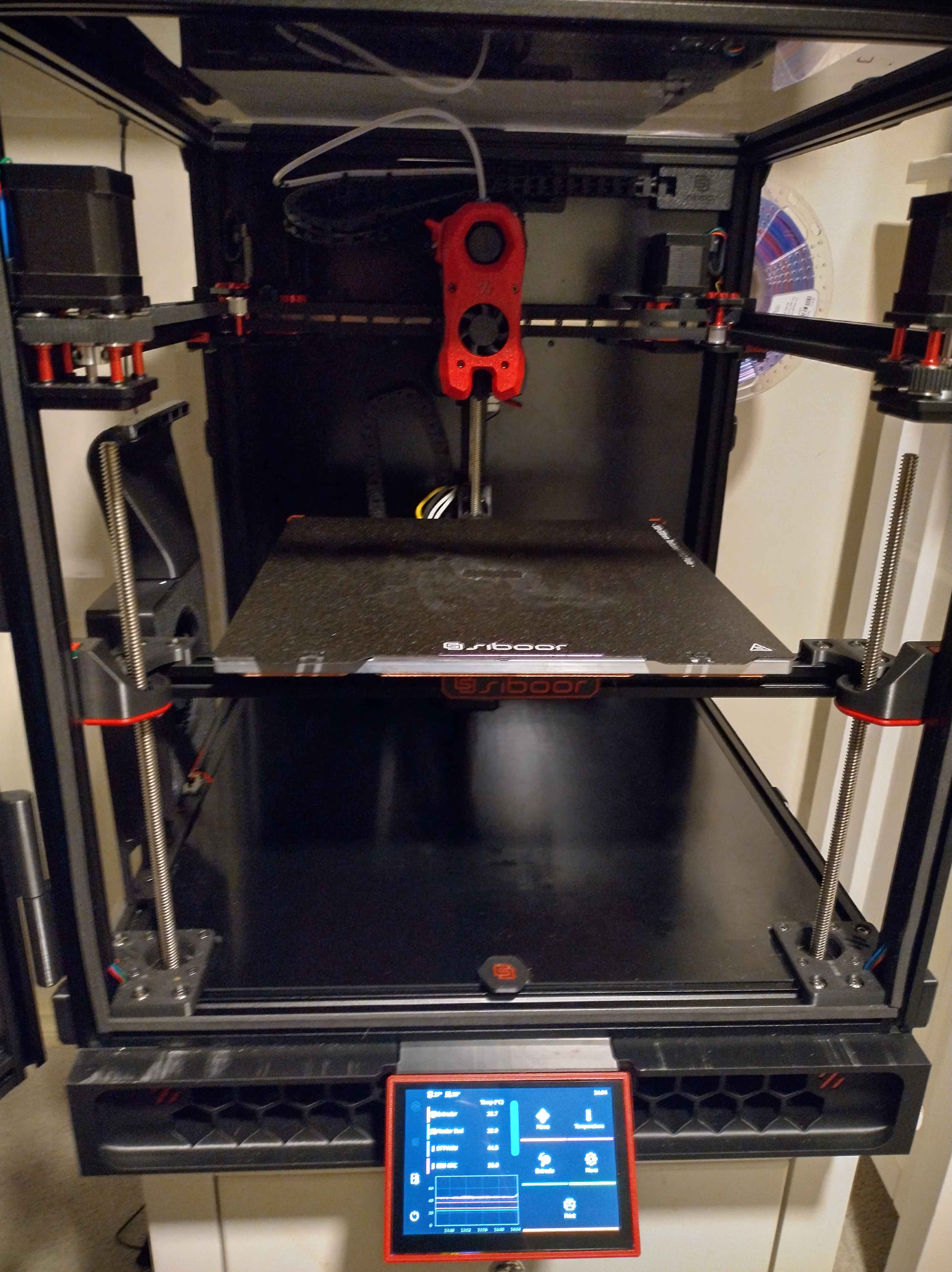
Then with that, the build was complete!

Build Completion Pic

Please excuse the messy build plate in the picture. I had completed some prints and felt like snapping a pic.

Updating Software

One of the first things I actually ran into a road block with was the software.

The servo control board acts as a Raspberry Pi comute module base board. This is all well and good but the kit comes with a Bigtreetech CB2. I almost threw the thing away because I assumed it was going to be like a non-Raspberry Pi level of support for it. To my surprise, Bigtreetech seems to periodically release images for the thing! It's running a 6.1 Linux kernel on the latest release (which at the time of writing, is still an active LTS kernel). The stock image also seems to come with most of the Klipper stack installed.

Once I installed the newest CB2 image, I needed to configure the CAN bus. With the Siboor kit, there seems to be 3 components which are on the CAN network:

  • The Manta M8P v2.0 control board
  • SB 2209 (rp2040) toolhead board
  • Cartographer bed scanner

Getting the UUID's of each of these meant plugging in each of the components one-by-one. At first, I simply just had the Manta completely unplugged from the toolhead (which also has the cartographer connected to it). Went to printer.cfg in klipper and scanned for CAN devices.

Next, I plugged in the toolhead board and unplugged the Cartographer from it. Rinse, repeat and plug in the Cartographer and do the same.

I then installed the Cartographer Klipper plugin as well as the Klipper LED Effects plugin using the README's of both on how to do that.

The Siboor CFG seems to use the legacy Cartographer settings syntax. I updated it to be the following:


#####################################################################
#                    Cartographer V3 (ADXL345)
#####################################################################
[mcu cartographer]
canbus_uuid: xxxxxxxxxxxxx

[cartographer]
mcu: cartographer
x_offset: 0                          # This is the offset of your probe from the nozzle tip, to the centre of the coil.
y_offset: 23                         # This is the offset of your probe from the nozzle tip, to the centre of the coil.
#backlash_comp: 0.01845
#calibration_method: touch           #    leave this as touch unless you want to use scan only for everything. 
#mode: scan
#sensor: cartographer                #    this must be set as cartographer unless using IDM etc.
#sensor_alt: carto                   #    alternate name to call commands. CARTO_TOUCH etc
#mesh_runs: 2                        #    Number of passes to make during mesh scan.
#scanner_touch_z_offset: 0.05        #    This is the default and will be overwritten and added to the DO NOT SAVE area by using UI to save z offset

[adxl345]
cs_pin: cartographer:PA3
spi_bus: spi1

[resonance_tester]
accel_chip: adxl345                  # Specifies ADXL345 accelerometer for resonance testing
probe_points:
    150, 150, 20                     # Coordinates of the probe points for resonance testing

The newer Cartographer firmware seems to inherently use less settings for some reason? Either way, once I got that all sorted out, I wasn't getting any more errors with my configuration and the Klipper was able to boot correctly. I now needed to update my firmware.

Flashing Firmware

This is where I truly appreciated the community efforts of a Voron. The CB2 was running a newer version of klipper to the control board and the toolhead board. Looking around online, ideally everything should be running the same version.

Because I'm running CAN, there's a project called katapult which allows me to write katapult as the bootloader of each embedded device on the CAN network and just push out newer klipper firmwares to them. I flashed the Manta control board first using this Esoterical project Manta M8P v2.0 make options. Using the same, I then built klipper and flashed it over. I did the same for the toolhead board using the Esoterical project SB 2209 (RP2040) options. The Cartographer firmware instructions came from the Cartographer 3D documentation directly.

Calibration

Once I got Klipper firmware on everything updated and running correctly, I simply followed Siboors' Documentation - Startup Checks and followed on from there.

I found that because of the new Cartographer plugin, I needed to modify the PRINT_START gcode a little. The CARTOGRAPHER_TOUCH macro was changed to CARTOGRAPHER_TOUCH_HOME.

The rest of the calibration steps were thankfully uneventful. I did tweak my Orca Slicer ABS filament profiles as I found that for the Sunlu ABS I bought, the default of 240c was a little too cold. 245c seems to print much better. I also only needed to turn on part cooling to 1% for bridges. Anything higher seems to lead to REALLY BAD layer adhesion.

Adding Extras

So far, I've only modified the printer a little.

Auxillary Fan

The Auxillery fan for some reason is plugged into a board, which simply connects another cable. I just soldered a longer cable to it because it was needlessly complex for what it is.

LED Bars

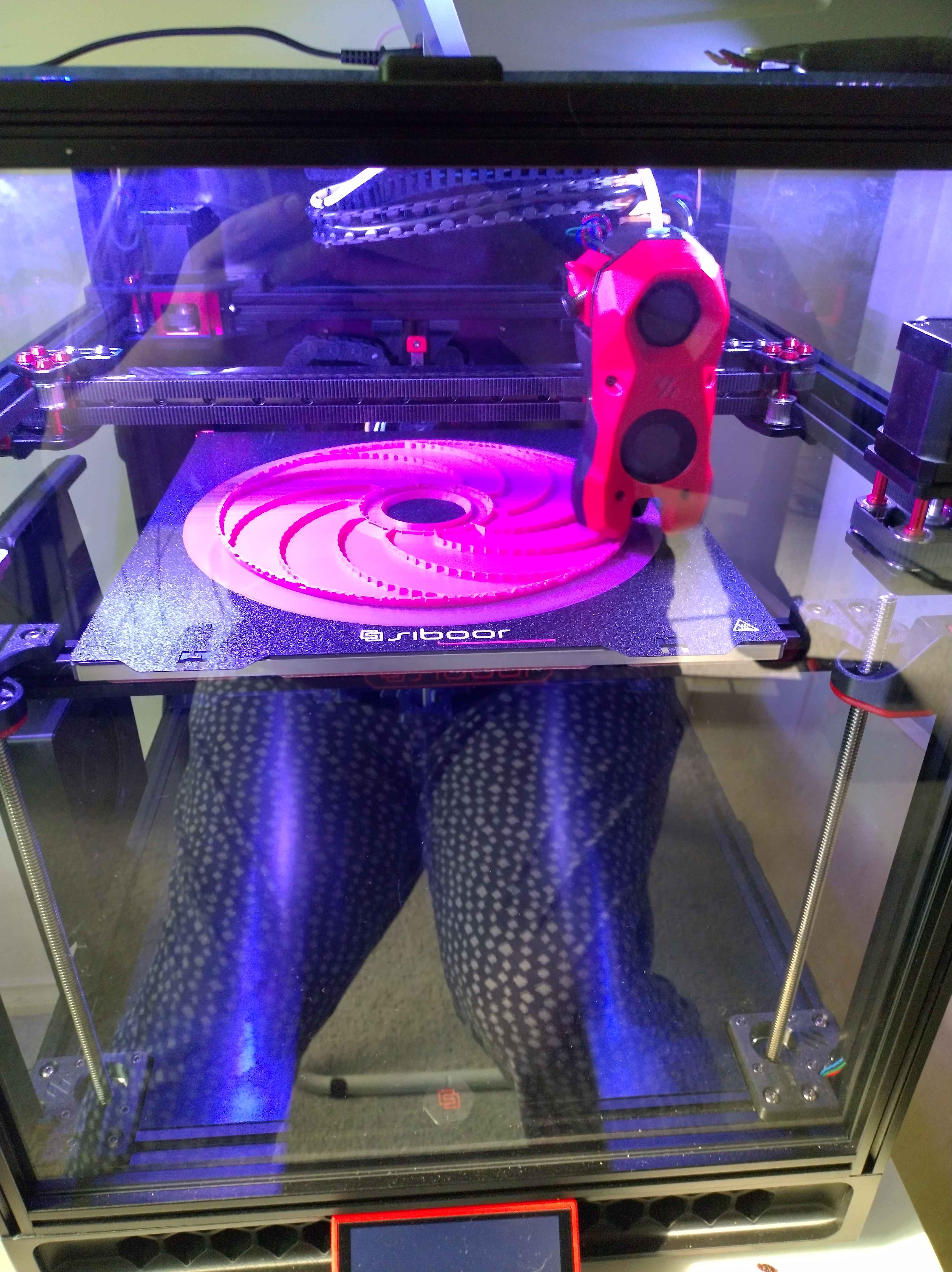
I also bought the Siboor LED strips which are based on the Daylight on a Stick Voron mod. I spliced the DIN pins together as there is only a single RGB header on the Manta M8P v2.0 board. For the second strip, I simply used the spare fan slot, set the jumper to 5v on it and plugging in the VCC and GND pins to that.

Frame Lights turned on

Galileo Extruder

I quickly found out that the Clockwork 2 extruder (the part of the printer that "grabs" and feeds filament to the hotend) was extremely finicky. I was constantly fiddling with it to try and just get it right. I saw that the Galileo extruder existed upon looking up alternatives and promply swapped to that. I just need to tighten the screw and it feeds filament with 0 issues.

Future Upgrades

The Siboor kit is pretty good and frankly, not much is missing. The only things I need now are a camera, a nozzle scrubber brush mod and a better air filter. I've ordered an ESP-CAM simply due to it being cheap.

For a brush, I'm getting some cheap knock-off AliExpress Bambu Labs cleaning brushes and plan on using this mod.

I've also bought a kit for a Nevermore Stealthmax and have been printing out parts of it. The kit comes with a Voron Fume Pack but it doesn't have any HEPA filters. The fume pack only uses carbon for pulling some of the nasties out of the air. I'll likely write a post about the Stealthmax once I get everything printed and running. Unlike the Trident build, I might actually take some more images of the build process of this.

Some point in the future, I'm planning on swapping out the Stealthburner toolhead with an Ant Head Toolhead. Once I do that, I'll get the pieces for a second toolhead and look at building a Mad Max Toolchanger.

Second Printer

I'm also slowly getting the parts for a second 3d printer. I like the Trident so much that I want a smaller one. That's why I've setttled on a 3d Printers for Ants - Salad Fork. Sadly I can't get a kit for this in Australia, but I'm able to get a bunch of subkits off of AliExpress. For the electronics, I'm getting all of the same stuff that's in the Trident. That means a Manta M8P v2.0 and CB2 combo, same SSR for the AC heatbed and same set of drivers. This means that I can cannibalise one of them if something breaks and then just wait for a replacement. It'll also make maintenance easier just having the same for both.

Thanks for reading through all of this!

Until next time,

Dani~

Class Notes

By dani - 25/08/06 23:15

Assessment 3 - Group Work Assessment

  • Class schedule in ICTPRG Announcements
  • Groups have been assigned
    • I'm part of the _Compiler group
  • Project manager responsible for organising team
    • Need some sort of share drive
    • Everyone is responsible for the quality

Assessment Task 3

  • "Getting your groups going"
  • Assessment task 2 is about advising a client on an issue
  • 3 documents
    1. Project Plan
    2. Project Logbook
    3. Meeting Agenda and Minutes
  • Free online version is different to the paid version
  • Use the free version?
    • State it in the documentation

Requirements

  • Well-structured
  • Comprehensive (for the 3 tasks each)
  • Collaboration and teamwork among group members
  • Potentially distribute the manual

Project Plan

  • Team Members
    • From announcements (lecturer provided)
    • Allocate teams to jobs
  • Goals
    • From assessment guide
  • Plan and prioritise tasks and timeframes
    • Setting dates for things due
  • Team workspace
    • Onedrive/ google drive etc

Content Creation

  • Going to document parts of office 365
    • Not creating comprehensive office 365 documentation
    • Only 4 components:
      1. Excel
      2. Word
      3. Powerpoint
      4. OneNote/OneDrive
    • 3 functions for each component
      1. Open/Create file
      2. Save file
      3. Do one task

Project Manager

  • Keeps everybody on track

Design and Formatter

  • Doesn't need to be anything fancy, only needs to look comprehensive
    • No errors, easy to read, easy to follow

Review and Editing

  • Ensure what's written actually works.

Testing

  • Part of Review and Editing

Project Logbook

  • Done by each member
    • This is a personal journal about how you contributed to the team
  • List team members
  • How you contributed to the team
    • What skills you brought to the group
    • What you contributed to meetings
    • How you collaborated
      • Email, whatsapp, google drive etc.
    • How you assisted other team members

Meeting Agenda an minutes

  • The lecturer would like to see at least 3 separate minutes
  • Minutes follow a particular format
  • Not just for keeping notes on what happened
    • Used for keeping a legal account of fulfilling duties
  • Includes
    • Date/Time
    • Chair (Usually project manager)
    • Minute taker
      • Chair and minute taker should be different people
        • Segregates duties
      • Chair runs the meetings
      • Minute taker should be independent (not self-serving)
      • However doesn't matter if the chair + minute taker since groups are so small
  • Responsibilities for minutues
    • Review minutes from last meeting
      • Refreshes everybody on what was said last time
      • Allows people to acknowledge that things in the prev meeting are "True and Fair"
    • Review Actions from previous Meetings
      • Shows that you're following on up on things from the previous meeting
      • Allocates accountability
    • Updates
      • Talk about issues
    • Actions
      • Things that need to get done
    • Feedback
      • Extra information/talk about updates, actions and review

Goin Over Alexanders Version of Final AT3:

  • Basic design
  • Automatic template for creating table of contents
    • Whenever created, just update automatically
      • Right click -> Update all
  • Headings
    • Correct level of headings for each section
  • Screenshots
    • Help show what the documentation is about
    • Include some graphics such as arrows to help highlight things
  • Alexander did more than required in his project
  • Expecting to see about 10 - 20 pages total

Summary for AT3: What's required

  • Get groups together
  • How we want to interact
  • Project manager find out inactives
  • Have at least 3 formal meetings with 3 minutes
  • Project manager does project plan
  • Other 2/3 people do the work
  • Check work is good
    • Ease of reading
    • Grammer
  • Give to a person who isn't great at computer to verify it works
  • Everybody responsible for the whole document